
Parking
Parking
Vernon offers several ways to park depending on where you’re going and how long you plan to stay. View the Downtown Vernon Parking Map.
Parking Options
- Available throughout downtown and surrounding neighbourhoods
- Mix of timed, metered, and free parking areas
- Convenient for quick errands, restaurant visits, and shopping
- Accessible stalls are also available in on street locations
- Loading zones designed for quick passenger drop offs or pick ups
- Time limits vary by location — watch for posted signage
- Best for those working downtown, commuters, and long duration stays
- Offered in City-owned parking lots and the downtown Parkade
- Annual and monthly permits available through HotSpot (while spaces last)
- Examples:
- 27A Avenue Lot
- Parkade (31 Ave & 33 St)
- College Way Lot
- Accessible stalls located throughout the city:
- On street areas
- City owned lots
- Recreation and event facilities
- Marked with signage and pavement symbols
- Users must display a valid accessible parking permit
Accessible parking passes are available for purchase at City Hall.
- Accessible stalls located throughout the city:
Downtown Vernon Parking Map
2026 parking permits
Parking permits offer a convenient long-term option for residents, employees, and visitors who park regularly in specific areas of the community.
Annual permits
- Go on sale each year starting January 2
- Provide guaranteed long-term parking in select lots
- Available on a prorated basis throughout the year (while capacity remains)
Monthly permits
- Offered for select lots, based on remaining inventory after annual permits
- Released on the first day of each month
- Ideal for seasonal or short-term needs
How to purchase
Annual and monthly permits can be purchased online through the HotSpot parking app.
- Download from the Apple App Store or Google Play Store
- Or set up an account through the HotSpot website at htsp.ca
- To ensure a smooth experience, customers are encouraged to download the HotSpot app and create their account ahead of time.
Annual permit locations
- 27A Avenue Lot (across from Fermco Rentals and Sales)
- Parkade (31st Ave. & 33rd St., next to the Vernon Public Art Gallery)
- College Way Lot (across from the Greater Vernon Athletics Park)
The following lots are currently full: Railway Lot, 33 Avenue Lot, 29th Street Lot
Monthly permit availability
- Monthly permits for any month in 2026 will be available based on remaining inventory after annual permit sales.
Permit holders must display their hang tag while parked in the designated lot.
Where to pick up your hang tag:
- 27A Avenue Lot & College Way Lot: Pick up at City Hall
- Parkade permits: Pick up at the Bylaw office located in the Parkade
Hours:
- 8:30 a.m. – 4:30 p.m.
- Please bring ID or your permit receipt.
- Hang tags will only be released to the permit holder listed at the time of purchase.
- Annual permits can now be purchased on a prorated basis throughout the year, as long as space is available in the lot.
- Long-term parking spots will be available only for lots that do not sell out through annual parking.
Accessible parking
There are accessible parking stalls located throughout the city that allow people with a permanent or temporary mobility impairment to park closer to their destination.
You must apply for an accessible parking permit to park in an accessible stall.
Additional Parking Information
City owned public parking lot and downtown Parkade rates:
- $0.75 per hour
- $5.00 per day
- $65.00 (plus GST) per month
Select lots offer free parking after 6 p.m. on weekdays and on weekends. Please refer to the signage in the individual lots.
On-street parking rates:
- $1.25 per hour from 9 a.m. to 6 p.m., with Sundays and Statutory Holidays free of charge.
Boat launch passes (Paddlewheel and Kalavista boat launches)
- $10.00 per day
- $60.00 per season*
*Seasonal boat launch passes may be used at both the Paddlewheel and Kalavista launches. Season passes can be purchased at the finance counter of Vernon City Hall or the District of Coldstream Municipal Office.

In June 2024, the Hotspot App has replaced PayByPhone at all City parking meters and select parking lots with hourly and daily parking options. The HotSpot app enables you to pay for vehicle parking in seconds.
The app is a completely cashless solution, reminds you when your parking session is about to expire and even lets you extend your parking time from anywhere! HotSpot is convenient, easy and secure.
Download the app on iOS or Android, or call 1-855-712-5888. All major credit cards as well as Visa and MasterCard debit are acceptable forms of payment.
Traditional payment methods, including coin and credit card payments, will still be accepted at parking meters and kiosks throughout the city.
Watch the instructional, step-by-step video on how to use the HotSpot app here.
How to Use the HotSpot Parking App
Create a HotSpot account.- Download the HotSpot Parking app. The app is a free download for Apple and Android devices from the App Store and Google Play Store.
- Open the app and click Get Started.
- Select your country. (Canada or USA)
- Select your province.
- Select your current city or location.
- Select your user preference (either daily parking or monthly permits). This can be changed later in your app settings.
- Enter your email address and click Next.
- Set your password and click Next.
- Accept the Terms of Service and Privacy Policy and click Submit.
- You will be given the option to “select plan”. Swipe to the left twice past Yearly, Monthly options and choose Park and Go and click Select Plan.
- Confirm that you are signing-up for the Park and Go plan.
Add a payment method.
- Click the button with three lines (sometimes called a “hamburger”) found in the top left corner of the screen to manage your account.
- Click Manage My Account.
- Under Membership and Balance, click Add/Manage Funds.
- To add a credit card, click Add Card.
- If prompted, enter the security code sent to your phone by text message.
- Enter your card information, the cardholder name, country and postal code.
- Click Save card.
To add funds to your digital wallet:
- From the home screen of the app, under Wallet Balance, click Add Funds.
- Select the amount you wish to add and click Add Funds.
- Select the card you want to use for the transaction.
- Click Use this Card.
- You should now see the funds in your wallet when you return to the home screen.
Next, add a vehicle.
- Click the button with three lines (sometimes called a “hamburger”) found in the top left corner of the screen to manage your account.
- Under Parking, click Manage My Vehicles.
- Click Add a Vehicle.
- Type in your licence plate. To avoid receiving a ticket, make sure it is entered correctly. Note: In British Columbia, most licence plates do not include the letter “O”, it is always the number “0” (zero). You may also enter additional information about the vehicle that will assist support staff in expediting the ticket dispute process.
- Click Add Vehicle to complete the process. You may add multiple vehicles to your account, just be sure to select the vehicle you are using when initiating your parking sessions.
- Click Yes to confirm your licence plate is correct.
How to add funds to your digital wallet:
- From the home screen of the app, under Wallet Balance, click Add Funds.
- Select the amount you wish to add and click Add Funds.
- Select the card you want to use for the transaction.
- Click Use this Card.
- You should now see the funds in your wallet when you return to the home screen. Funds stored in the digital wallet can be withdrawn from customer accounts upon request.
Frequently Asked Questions
- Why is the HotSpot App is slow to load or won't load at all?
Please ensure you have mobile data available or are connected to a network with internet access. If you have your Wifi turned on you may have inadvertently connected to a network without internet access. - Why did Vernon transition to a new mobile parking provider?
As the contract with the current provider was expiring a request for proposals process was undertaken to ensure that residents were getting the best value. - Why was HotSpot selected as the new parking system?
The new payment system, HotSpot, is a well-established and trusted app used by numerous of municipalities across Canada. HotSpot offers a wide variety of features and competitive pricing. - What are the benefits of using HotSpot?
- Convenient Payment Options: Payments can be made using all major credit cards, Google Pay, Apple Pay, Visa Debit, and pre-paid credit cards.
- Fast Tap QR code signs: In select City parking users can easily pay without downloading the app by simply scanning the QR code with their smartphones.
- Reduced Convenience Fees: The convenience fees for using the HotSpot app are lower than those associated with the previous provider.
- Refunds for Unused Time: The HotSpot app allows users to refund the remaining time back to their digital wallet if they return to their vehicle before their parking session has expired, offering greater flexibility and cost-efficiency.
- Can I park downtown if I don't have a cellphone?
Yes, on-street parking meters accept coins, and Cale pay stations accept coins or credit cards in the flat-surface lots and Parkade. - Are there minimum requirements for transaction amounts?
Yes, the minimum charge the HotSpot payment processor will charge for a parking session is $1.00. However, if you use funds that have been loaded into the Wallet function there is no minimum charge. - Is prepayment available with the new system?
Yes, vehicles will be able to pre-pay in most zones starting at 5 a.m. - Do you have to sign up for a membership to use the HotSpot app?
No membership is required to use the app. - What are the convenience fees?
- The convenience fees to use the HotSpot app are 20 cents per transaction.
- Fast Tap convenience fees are 30 cents per transaction.
- Can I use the Fast Tap option without downloading the HotSpot app?
Yes, simply scan the QR code to pay for parking with your smartphone. - Where is HotSpot customer data stored, and is it secure?
HotSpot utilizes Amazon Web Services (AWS) for data storage which has industry leading security. Credit card data is encrypted, and data centers are located in Canada. - What is the HotSpot wallet used for?
- All HotSpot users have access to a wallet feature in their account. The wallet is used for hourly parking. To use the wallet, toggle on the ‘Use Wallet’ feature in the App Settings section (found in the drop down menu in the upper left hand corner).
- Funds can be added to the wallet at any time using a credit card, Visa Debit or prepaid Visa/MasterCard gift cards.
- There is a $10 minimum to load your wallet.
If you look on the reverse side of each ticket, you will find information and directions regarding how you may pay, appeal or dispute a ticket. For more information about paying, appealing and disputing, please see our Bylaws page.
There are numerous parking choices for spending time downtown Vernon. A parking map provided by Downtown Vernon shows parking options. Recent improvements include access to pay by phone options allowing additional payment and customer service opportunities.
Downtown Vernon Parking Map
There are several free, 10-minute loading zones for pick-up and drop-off throughout the Downtown.
These loading zones are intended for customers of nearby restaurants, retailers, and other businesses for quick item pick-up or passenger drop-off. If you need to stay longer than 10 minutes, then please find a different parking spot.
Requests for additional curbside pick-up locations in the Downtown Business Improvement Area may be emailed to csbreception@vernon.ca .
Ten-minute loading zones are marked by green signs over the meter (see image below). The exact locations can be found on the City’s map.
Image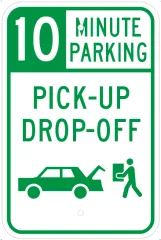
The downtown parkade entrance gates are locked nightly. Vehicles must be out of the parkade before the final lockup hour. Lockup is provided by Cancom Security.
Parkade hours:
Monday to Friday | 6:00 a.m. to 8:00 p.m.
Saturday | 9:00 a.m. to 7:00 p.m.
Sunday | ClosedEmergency phone numbers:
City of Vernon Bylaws: 250-550-3505
Alpha Omega Security: 250-503-4853Call City of Vernon Bylaws for assistance. Patrons may be required to pay a fee to the security company if unlocking the gates is requested after final lockup.
Boat launch pass rates for Paddlewheel and Kalavista boat launches:
- $10.00 per day
- $60.00 per season*
*Seasonal boat launch passes may be used at both the Paddlewheel and Kalavista launches. Season passes can be purchased at the finance counter of Vernon City Hall or the District of Coldstream Municipal Office.
Vehicles with Veteran’s plates are not required to pay for parking at parking meters, in the Parkade, or the day use areas of the City Parking Lots. Maximum parking time limits at parking meters still apply and only monthly parking pass holders can park at City surface lots reserved for monthly pass holders.
In response to neighbourhood concerns regarding intrusive non-residential on-street parking in the community, the City has formed a Resident Exempt Parking Area (REPA) Policy outlining a process for residents to have their request for a REPA in their neighbourhood evaluated. REPAs are parking strategies implemented in neighbourhoods intended to address heavy demand from nearby high trip generators such as hospitals, community centres, and shopping districts. Upon expression of interest from residents through a resident-led petition, the City will recommend implementing a REPA for Council’s consideration, subject to passing a warrant assessment. To review the procedures and determine how to submit a Letter of Request for a REPA, please review the Resident Exempt Parking Area Policy.
In 2011 the City of Vernon completed the City Centre Neighbourhood Plan (CCNP) which aims to articulate a shared vision to guide investments to garner maximum benefit for the community and to guide decisions on municipal budgeting, infrastructure investment, projects, and land development in the City Centre.
Parking was identified as a critical issue through community consultation and many recommended actions of the CCNP are related to parking management. A document included in the related links has been developed as an implementation strategy for the parking-related actions of the CCNP.